Creating a multinode Apache Spark cluster on AWS from command line

The idea is to create a Spark cluster on AWS according to the needs, maximize the use of it and terminate it after the processing is done.

All the instances have Ubuntu 14.04 operating system, the instance used in the following script the free-tier t2.micro instance with 8GB storage and 1GB RAM.

To have this working from the command line, aws package has to be installed.

One instance, master in this case, is always in State “running” and this instance has the following installed:

  • aws package
  • Apache Spark

How to install Spark 2.0 is described here. There is also the link to the blog about how to install Spark History Server.

The Spark History Server can be reached on port 18080 – MASTER_PUBLIC_IP:18080 and Spark Master is on port 8080. If the pages do not load, start the services as spark user. The scripts for starting the services can be found in $SPARK_HOME/sbin.

The script for launching instances

The following script takes in one parameter – number of instances to launch and attach them to the spark cluster. These instances would become workers in the spark world.

A new script is created

vi create-spark-cluster.sh

And the following lines are written in it. Adjust accordingly (details below).

#!/bin/sh

#removes any old associations that have "worker" in it
sudo sed -i.bak '/worker/d' /etc/hosts

#removes known hosts from the file
sudo sed -i 'd' /home/ubuntu/.ssh/known_hosts

#run the loop to create as many slaves as defined in the input parameter
for i in $(seq -f %02g 1 $1)
do
  #name of the worker
  NAME="worker$i"

  #run the aws command to create an instance and run a script when the instance is created.
  #the command returns the private IP address which is used to update the local /etc/hosts file
  PRIV_IP_ADDR=$(aws ec2 run-instances --image-id ami-0d77397e --count 1 \
            --instance-type t2.micro --key-name MYKEYPAIR \
            --user-data file:///PATH_TO_SCRIPT/user-data.sh \
            --subnet-id SUBNET_ID --security-group-ids SECURITY_GROUP \
            --associate-public-ip-address \
            --output text | grep PRIVATEIPADDRESSES | awk '{print $4 "\t" $3}')

   #add the IP and hostname association to the /etc/hosts file
   echo "$PRIV_IP_ADDR" "$NAME" | sudo tee -a /etc/hosts

done

Line 19: option user-data allows you to define a file that is run on the new instance. In this file, the steps for Spark worker installation and setup are defined.
MYKEYPAIR: name of the private key you use in AWS console when launching new instances (this is not a path to the private key on the instance you are running the script from!).
SUBNET_ID: ID of the subnet you are using. It is something one creates when starting with EC2 in AWS.
SECURITY_GROUP: name of the existing security group that this instance should use.


The script that runs at instance launch

The following commands in the script are run as soon as each instance is created.
At the top of the script, the operating system is updated, python is installed and JDK as well.

#!/bin/sh

sudo apt-get update -y  && \
sudo apt-get install python-minimal -y && \
sudo apt-get install default-jdk -y && \
cd /etc/ && \
sudo wget http://d3kbcqa49mib13.cloudfront.net/spark-2.0.1-bin-hadoop2.7.tgz && \
sudo tar -xvzf spark-2.0.1-bin-hadoop2.7.tgz && \
sudo rm spark-2.0.1-bin-hadoop2.7.tgz && \
sudo useradd spark && \
export SPARK_HOME=/etc/spark-2.0.1-bin-hadoop2.7 && \
sudo chown -R spark:spark $SPARK_HOME && \
sudo -u spark mkdir $SPARK_HOME/logs && \
sudo -u spark $SPARK_HOME/sbin/start-slave.sh spark://ip-10-0-0-95.eu-west-1.compute.internal:7077

Lines 6-7: Spark package is downloaded into /etc/ and unpacked.
Line 14: The slave is started and connected to the master node (Spark Master’s URL address is the script’s parameter).

Example of running the script

Thre following example creates a Spark cluster with 3 workers.

sh create-spark-cluster.sh 3

Example of the output:

10.0.0.104      ip-10-0-0-104.eu-west-1.compute.internal worker01
10.0.0.80       ip-10-0-0-80.eu-west-1.compute.internal worker02
10.0.0.47       ip-10-0-0-47.eu-west-1.compute.internal worker03

These three lines are also added to the /etc/hosts.

The Spark Master Web Interface (SPARK_MASTER_PUBLIC_IP:8080) gives more details about the Spark cluster.

spark-master

The interface displays the recently added workers with State being ALIVE. Two workers have are in state DEAD – they have been terminated from AWS, but Spark Master has not updated the Workers statistic yet.

Memory in use is 3 GB – the instances used in the cluster creation has one GB each.

Conclusion

The blog post shows a very simple way of creating a Spark cluster. The cluster creation script can be made a lot more dynamic and the script that is run on the newly created instances could be extended (installing python packaged needed for work).
Notes from Marz’ Big Data – principles and best practices of scalable real-time data systems – chapter 2

Notes from chapter 1

2.             Data model for Big Data

2.1 The properties of data

The core of the Lambda architecture is the master dataset. It is the only part of the architecture, which should be guarded from corruption.

There are two components to the master dataset:

  • data model
  • how master dataset is physically stored

Definitions of the terms:

  • information – general collection of information relevant to the system
  • data – information that cannot be derived from anything else
  • queries – questions to ask the data
  • views – information derived from the base data

One person’s data can be another’s view.

2.1.1       Data is raw

It is best to store the rawest data you can obtain. This is important because you might have some question to ask your data in the future that you cannot ask now.

Unstructured data is rawer than normalized data. When deciding what raw data to store, there is a grey area between parsing and semantic normalization. Semantic normalization is the process of transforming free-form information into structured form. The semantic normalization algorithm would try to match the input with a known value.

It is better to store data in unstructured form, because the semantic normalization algorithm might improve over time.

2.1.2       Data is immutable

Relational databases offer operation update. With Big Data systems, immutability is the key. Data is not updated or deleted, only added. Two advantages derive from it:

  • human-fault tolerance – no data is lost if a human failure is present
  • simplicity – immutable data model offers only append operation

One trade-off for immutable approach is that it uses more storage.

2.2 The fact-based model for representing data

Data is the set of information that cannot be derived from anything else.

In the fact-based model, you represent data as fundamental units – facts. Facts are atomic because they cannot be divided into further into meaningful components. Facts are also timestamped, which makes them eternally true.

Facts should also be uniquely identifiable – in case of two identical data coming in at the same time (f. ex. pageview from same IP address at the same time), nonce can be added. Nonce is a 64-bit randomly generated number.

Fact-based model:

  • stores your raw data as atomic facts.
  • facts are immutable and eternally true
  • each fact is identifiable

Benefits of the fact-based model:

  • queryable at any time in history
  • human-fault tolerant
  • handles partial information
  • has advantages of normalized (batch layer) and denormalized (serving layer) forms. These are mutually exclusive, so a choice between query efficiency and data consistency has to be made.

Having information stored in multiple locations increases the risk of it becoming inconsistent (list of values type of solution is in place here). This removes the risk of inconsistency, but a join is needed to answer queries – potentially expensive operation.

In the Lambda architecture, the master dataset is fully normalized. The batch views are like denormalized tables and are defined as functions on the master dataset.

2.3 Graph schemas

Graph schemas capture the structure of a dataset stored using the fact-based model.

2.3.1       Elements of a graph schema

Graph schema has three components:

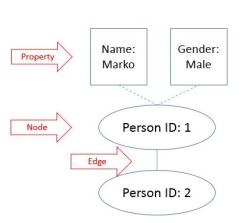
  • nodes – entities in the system
  • edges – relationships between nodes
  • properties – information about entities

graph.JPG

2.3.2       The need for an enforceable schema

Information is now stored as facts, graph schema describes the types of facts. What is missing is in what format to store the facts.

One option is to use semistructured text format like JSON. This provides simplicity and flexibility. The challenge might appear when valid JSON but with inconsistent format or missing data appears.

In order to guarantee consistent format an enforceable schema is an alternative. It guarantees all required fields are present and ensure all values are of expected type. This can be implement using serialization framework. Serialization network provides a language-neutral way to define the nodes, edges and properties of the schema.


One of the beauties of the fact-based model and graph schemas is that they can evolve as different types of data become available.


Notes from Marz’ Big Data – principles and best practices of scalable real-time data systems – chapter 1

Notes from Big Data: Principles and best practices of scalable realtime data systems, which is a book about how to implement Lambda architecture using Big Data technologies.

1.           A new paradigm for Big Data

1.1  Scaling a traditional database

When you evolve the application, you will run into problems with scalability and complexity.

Steps from traditional database to Big Data architecture:

  1. Single increment is wasteful; it is more efficient to batch many increments in a single request. This is done by using queues – 100 events from the queue are read and processed.
  2. Database gets overloaded, one worker cannot keep up – you parallelize the updates. You try to scale a relational database – multiple servers are used and spreading the table across all the servers – each server will have a subset of the data, aka horizontal partitioning or sharding.
  3. At one point, a bug sneaks in the production.

More time is spent on dealing with reading and writing data, and less on building new features for customers.

1.2  How will Big Data techniques help?

The databases and systems for Big Data are meant for distributed work. Sharding and replication are handled for you. For scaling, you just add nodes and the systems rebalances automatically.

Making data immutable is another key feature.

Scalable data systems are available now.  Large-scale computation system like Hadoop and databases like Cassandra and MongoDB. They can handle very large amounts of data, but with trade-offs.

Hadoop can parallelize large-scale batch computations on very large amounts of data, but with high latency.

NoSQL databases offer you scalability, but with a more limited data model than what SQL has to offer.

These tools are not a universal problem solver. However, with the best use in a combination with one another, you can build scalable systems with human-fault tolerance and minimum complexity. The Lambda architecture offers that.

1.3  Desired properties of a Big Data system

A Big Data system must perform well and be resource-efficient.

1.3.1       Robustness and fault tolerance

Systems need to behave correctly despite machines going down randomly. The systems must be human-fault tolerant.

1.3.2       Low latency reads and updates

Big Data systems have to deliver low latency updates when needed.

1.3.3       Scalability

Scalability is the ability to maintain performance in case of increasing data by adding resources to the system.

1.3.4       Generalization

A general system can support a wide range of applications. Lambda architecture generalizes by basing on functions of all data; whether financial systems, social media analytics, etc.

1.3.5       Extensibility

Functionality is added with minimum development cost.

1.3.6       Ad hoc queries

It is important to be able to do ad hoc queries. Every dataset has some unexpected value in it.

1.3.7       Minimal maintenance

Keep it simple. The more complex a system, the more likely something will go wrong. Big Data tools with little implementation complexity should be prioritized. In Lambda architecture, the complexity is pushed out of the core components.

1.3.8       Debuggability

A Big Data system must provide the information necessary to debug the system when needed. The debuggability in Lambda architecture is accomplished in the batch layer by using recomputation algorithms when possible.

1.4  Lambda architecture

There is no single tool to provide a complete solution. A variety of tools and techniques is needed to build a complete Big Data system.

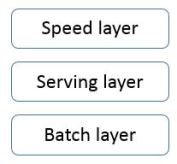
The main idea is to build a Big Data system as a series of layers. Each layer build upon functionality provided by the layer beneath it.

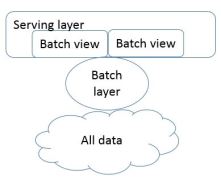
all-layers-1

Everything starts from the following equation:

query = function(all data)

Ideally, you could run the functions on the fly to get the results. This could be too expensive and too resource consuming. Imagine reading petabytes of data every time one simple query is executed.

The best alternative is to precompute the query function. The precomputed query function is the batch view. User’ query fetches data from the precomputed view. The batch view is indexed so that it can be accessed with random reads. The above equation would now look like this:

batch view = function(all data)

query = function(batch view)

Creating the batch view is clearly a high-latency operation. By the time it finishes, new data will be available that is not presented in the batch views.

all-layers-2

1.4.1       Batch layer

The batch layer stores the master copy of the dataset and precomputes the batch views on it.

The batch layer needs to be able to do two things:

  • store immutable, growing master dataset
  • compute random functions on that dataset (ad hos queries)

The batch layer is simple to use. Batch computations are written like single-threaded programs and the parallelism comes free.

The batch layer scales by adding new machines.

1.4.2       Serving layer

The serving layer is a specialized distributed database that loads in a batch view and makes it possible to do random reads on.

A serving layer database supports batch updates and random reads. It does not need to support random writes. Random writes cause most of the complexity in databases.

The serving layer uses replication in case servers go down. Serving layer is also easily scalable.

1.4.3       Speed layer

The speed layer ensures that new data is represented in query functions. It looks only at recent, new data.

It updates the real-time views as it receives new data. It does not recompute the views from scratch like the batch layer.

real-time view = function(real-time data, new data)


The Lambda architecture in three equations:

batch view = function(all data)

real-time view = function(real-time data, new data)

query = function(batch view, real-time view)


Results from queries come from merging results together from batch and real-time views.

One data makes it from batch layer into serving layer; the corresponding results in the real-time views are no longer needed.

The speed layer is far more complex than the batch and serving layer. This is called complexity isolation – complexity is pushed into a layer who delivers temporary results.

On the batch layer, the exact algorithm is used, while on the speed layer, an approximate algorithm is used.

The batch layer constantly overrides the speed layer, so the approximations are corrected – the systems shows eventual accuracy.

1.5  Recent trends in technology


1.5.1       CPUs are not getting faster

We are hitting limit of how fast a single CPU can go. This means that if you want to scale more data, you must parallelize your computation.

Vertical scaling – scaling by buying a better machine.

Horizontal scaling – adding more machines.

1.5.2       Elastic clouds

Rise of elastic clouds – Infrastructure as a Service. User can increase or decrease the size of the cluster instantaneously.

1.5.3       Vibrant open source ecosystem for Big Data

Five categories of open source projects:

  • Batch computation systems

High throughput, high latency systems. Example is Hadoop.

  • Serialization frameworks

Provide tools and libraries for using objects between languages. They serialize an object into a byte array from any language and then deserialize that byte array into an object in any language. Examples are Thrift, Avro, and Protocol Buffers.

  • Random access NoSQL databases

They lack full expressiveness of SQL and specialize on certain operations. They are meant to be used for specific purposes. They are not meant to be used for data warehousing. Examples are Cassandra, HBase and MongoDB.

  • Messaging/queuing systems

They provide a way to send and consume messages between processes in a fault-tolerant and asynchronous way. They are key for doing real-time processing. Example is Kafka.

  • Realtime computation system

They are high throughput, low latency and stream-processing systems. They cannot do computations like batch-processing systems can, but they process messages extremely quickly. Example is Storm.

Notes from chapter 2

Creating first Scala project with sbt and submitting it to Apache Spark

The environment for the following project build was the following: Ubuntu 14.04 on a AWS EC2 instance, sbt version 0.13.13 (how to install it) and Apache Spark 2.0.1 on local mode (although the same procedure has been done and worked on a Hortonworks Hadoop cluster with Spark 2.0).

The Scala example file creates a SparkSession (if you are using Apache Spark version older than 2.0, check how to create all the context in order to run the example. Or upgrade to Spark 2.0!), reads a csv file into a DataFrame and outputs the DataFrame to the command line.

Create new project folder and step in it

mkdir scala-ne
cd scala-ne

Create data folder, step in it and create a test data file

mkdir data
cd data
vi n-europe.csv
1,Oslo,Norway
2,Stockholm,Sweden
3,Helsinki,Finland
4,Copenhagen,Danmark
5,Reykjavik,Iceland

Save the data file and exit vi.

Create the Scala file

vi spark-ne.scala

Copy the following code in the Scala file (make sure the path to the csv file is valid). If you are doing this on an node that is a part of HDFS cluster, be sure to add file:// at the beginning of the file path string.

import org.apache.spark.sql.SparkSession

object ne {

        def main(args: Array[String]) {
                val fil = "/SPARK-NE_PROJECT/data/n-europe.csv"

                val spark = SparkSession
                        .builder
                        .appName("Scala-Northern-E")
                        .getOrCreate()

                val neDF = spark.read.csv(fil)
                neDF.show()
        }
}

Create build file build.sbt

vi build.sbt

And type the following lines (make sure to leave the empty line between each line). Adjust the Scala and spark-sql version accordingly!

name := "Spark-ne"

version := "1.0"

scalaVersion := "2.11.8"

libraryDependencies += "org.apache.spark" %% "spark-sql" % "2.0.0"

Run the following command to build the project

sbt package

The last three line of the output

[info] Packaging /user/marko/scala-ne/target/scala-2.11/spark-ne_2.11-1.0.jar ...
[info] Done packaging.
[success] Total time: 69 s, completed Jan 7, 2017 8:22:38 PM

Running the sbt package command the first time is going to take more time because the jar files are downloading. Maven users should feel like home here.
If you make changes to the Scala file and run the command again, it takes less time. Below is an example of the next build call

[info] Packaging /user/marko/scala-ne/target/scala-2.11/spark-ne_2.11-1.0.jar ...
[info] Done packaging.
[success] Total time: 8 s, completed Jan 7, 2017 8:29:12 PM

The code can now be submitted to Spark. Adjust the path to the JAR file accordingly.

$SPARK_HOME/bin/spark-submit --class ne /user/marko/scala-ne/target/scala-2.11/spark-ne_2.11-1.0.jar

If everything went as it should, the table of Northern European cities and countries is seen in the output.

Installing sbt on Ubuntu for building Scala projects

Using Apache Spark for big data processing offers also a possibility to use Scala. Despite Python being more popular than Scala, Scala is still THE language in Apache Spark world. It is time to start writing code in it.
The interactive tool sbt helps you build Scala and Java projects. It is similar to Java’s Maven or Ant. It offers native support for compiling Scala and, among other things, offers support for mixed Scala/Java projects.

Run the following to install sbt.

echo "deb https://dl.bintray.com/sbt/debian /" | sudo tee -a /etc/apt/sources.list.d/sbt.list
sudo apt-key adv --keyserver hkp://keyserver.ubuntu.com:80 --recv 642AC823
sudo apt-get update -y
sudo apt-get install sbt -y

Test sbt by running

sbt version

Should return something like this

[info] Set current project to ubuntu (in build file:/home/ubuntu/)
[info] 0.1-SNAPSHOT

The tool is now installed and ready to use.

You can run sbt by simply typing

sbt

Creating an example Scala project that works with Apache Spark is described in this post.

Spark Summit Europe 2016 – speech summaries

Spark Summit Europe 2016 was in Brussels between the 25th and 27th of October. I have seen some speaches on the Spark Summit website and this post is about a short summary with notes which are useful in my work. Hope someone else finds them useful.
The speaches are in no praticular order.

Lambda Architecture with Spark in the IoT

by Bas Geerdink from ING

Link to the video.

The speaker presents how they have used Lambda architecture proposed by Nathan Marz from LinkedIn. Marz has initially used HDFS and Storm in the Lambda architecture.

The Use Case is Smart Parking and it is about optimizing parking challenges in Amsterdam – IoT helps a car driver finding the most optimal parking place.

Stream process:

  • get car events
  • filter events according to the business rules
  • store events
  • get information from the car park in the neighborhood
  • predict score and update database
Lambda Architecture

Capacity updates (information about car parks) coming in in a batch and are stored in HDFS, GPS updates from the cars are coming in a stream in message broker Kafka 0.10.
Spark is used in streaming and batch layers in the Lambda architecture.
Spark is also used for Machine Learning modelling and Zeppelin is the graphical user interface the data scientists use for their work. In the video, at 22:40, this is graphically presented.
Cassandra is the place for storing the scores (results) and the APIs on top of Cassandra are available to the users.

Event processing with Kafka is shown on one slide, streaming is also explained with code example, and the batch processing is the as well. The speaker mentions a github account with available code – fast-data.

Bas is very good at explaining the IoT architecture, too bad he did not have more time.

Nathan Marz’s book on Lambda architecture. Very well written and explained.


My Work cluster in detail

The cluster was built on OpenStack private cloud owned by a Swiss organization Switch.

The Hadoop distributor was Hortonworks, except for Spark and Zeppelin, who were Apache’s.

Potential users

Since the project owner was an organization supporting educational entities in Switzerland, the potential users were researchers, scientists, students…

I had the luxury of having almost unlimited resources on the infrastructure so I have built 5 Hadoop clusters – 4 were Hortonworks Hadoop clusters, one was Apache Hadoop cluster. Out of the 4, one was the Work environment which was exposed to the end users. And this is the cluster that is described in detail in this post.
Keep in mind that I was working on my own on this development – which meant administering and upgrading 5 clusters and doing data science at the same time. In order to make it work, I had to use the YARN inside me and distribute the limited resources effectively.

Initial resources

Keeping in mind the point of distributed systems is scalability, I have defined the initial cluster with the following capabilities.
6 instances with corresponding details:

  • Ambari Server
  • NameNode
  • DataNode (3)
  • Client
Instance RAM VCPU Default disk size Volume No. Volume Size Security group
Ambari 8GB 8 VCPU 20GB None None sg-ambari
NameNode 32GB 8 VCPU 20GB 1 200GB sg-namenode
DataNode (3) 32GB 8 VCPU 20GB 3 200GB sg-datanode
Client 16GB 16 VCPU 20GB 1 500GB sg-client

Note: There were three DataNodes in the initial cluster.

Characteristics of the cluster

The initial cluster had 1.7 TB HDFS, replication factor was 3, block size was the default 128MB. Rack awareness was not set in the initial cluster and the queue was the default.
On the YARN side, I have made some changes and had 84GB RAM (3 x 32GM = 96GB RAM. 4GB per DataNode was left for services on the instance -> 96GB – 12GB = 84GB) as maximum amount of RAM resources for the cluster – the default values by Apache (Hortonworks?) are quite more conservative.

In the cluster building process the versions were Ambari 2.1 and HDP 2.3. When Ambari 2.2 and HDP 2.4 were available, the cluster was upgraded.

Ambari

Ambari had a server for itself, the database for collecting statistics was MySql. The idea was always to migrate the Ambari Server if needed. The migration to new Ambari server is easy so I could afford to start small for this service.
The Ambari Views was enabled for the users who wanted to upload the files to the HDFS manually. Hive was also available through this service and I on my one of my test environments, I have even embedded Zeppelin in Ambari Views. Though, on the Work cluster, Zeppelin was offered only as an independent service on the Client.
All the ports for Ambari to properly work were in the sg-ambari security group.

NameNode

The initial plan with the NameNode was to run all the services on it except Spark and Zeppelin. When the resources would expand beyond the instance’s capabilities, some services would be moved to a new instance, or unused services would be stopped (experience showed Hive had little popularity among the academia). Using Ambari, migrating services is an easy process, I could afford to have all services running on one NameNode. Only cluster administrator had access to this instance. With other words, client tools were not installed on this instance.
All the ports for the NameNode to properly work were in the sg-namenode security group.

DataNode

I started with 3 DataNodes, which offered 1.7TB of storage on the HDFS. The DataNodes were also used as Workers for Spark and Supervisors for Storm. The users had no access to the DataNodes directly – no client was installed here. This would change according to the needs so that some jobs could access data directly locally.
All the ports for the DataNodes to properly work were in the sg-datanode security group.

Client

The client was users’ window to the cluster. Spark 2.0 (before Summer 2016 it was Spark 1.6) was offered as the computational engine – only one. One reason was also easier administration and optimizatoin from my side.
The users could use the command line interface (CLI), RStudio or Zeppelin. Ambari Views as well, but that was running on Ambari instance. More advanced users went with the CLI, users who wanted to learn Spark were using Zeppelin.
Client for Storm was also installed on this instance. Due to more complex programming (in Java), all the Topologies were handled by me, the users were defining requirements and using the data stored by the Storm.
All the ports for the Client to properly work were in the sg-datanode security group.

See below for page 2.

Error “org.apache.hive.hcatalog.data.JsonSerDe not found” while accessing Hive tables from spark-sql

In the Hadoop cluster, I am running Spark 2.0 on a Client node, separately from Hive services.

If I would like to connect to Hive Metastore using spark-sql, hive-hcatalog-core-0.13.0.jar has to be added to the jars folder in Spark home directory.

Step into $SPARK_HOME/jars folder and run the following

sudo -u spark wget http://central.maven.org/maven2/org/apache/hive/hcatalog/hive-hcatalog-core/0.13.0/hive-hcatalog-core-0.13.0.jar

Now I can run spark-sql and queries on the tables in the databases.

If the jar file is missing, and by running for example

desc table_name

the following error message is displayed

ERROR hive.log: error in initSerDe: java.lang.ClassNotFoundException Class org.apache.hive.hcatalog.data.JsonSerDe not found
java.lang.ClassNotFoundException: Class org.apache.hive.hcatalog.data.JsonSerDe not found
        at org.apache.hadoop.conf.Configuration.getClassByName(Configuration.java:2101)
        at org.apache.hadoop.hive.metastore.MetaStoreUtils.getDeserializer(MetaStoreUtils.java:385)
        at org.apache.hadoop.hive.ql.metadata.Table.getDeserializerFromMetaStore(Table.java:276)
        at org.apache.hadoop.hive.ql.metadata.Table.getDeserializer(Table.java:258)
        at org.apache.hadoop.hive.ql.metadata.Table.getCols(Table.java:605)
        at org.apache.spark.sql.hive.client.HiveClientImpl$$anonfun$getTableOption$1$$anonfun$apply$8.apply(HiveClientImpl.scala:339)
        at org.apache.spark.sql.hive.client.HiveClientImpl$$anonfun$getTableOption$1$$anonfun$apply$8.apply(HiveClientImpl.scala:335)
        at scala.Option.map(Option.scala:146)
        at org.apache.spark.sql.hive.client.HiveClientImpl$$anonfun$getTableOption$1.apply(HiveClientImpl.scala:335)
        at org.apache.spark.sql.hive.client.HiveClientImpl$$anonfun$getTableOption$1.apply(HiveClientImpl.scala:333)
        at org.apache.spark.sql.hive.client.HiveClientImpl$$anonfun$withHiveState$1.apply(HiveClientImpl.scala:262)
        at org.apache.spark.sql.hive.client.HiveClientImpl.liftedTree1$1(HiveClientImpl.scala:209)
        at org.apache.spark.sql.hive.client.HiveClientImpl.retryLocked(HiveClientImpl.scala:208)
        at org.apache.spark.sql.hive.client.HiveClientImpl.withHiveState(HiveClientImpl.scala:251)
        at org.apache.spark.sql.hive.client.HiveClientImpl.getTableOption(HiveClientImpl.scala:333)
        at org.apache.spark.sql.hive.HiveExternalCatalog$$anonfun$tableExists$1.apply$mcZ$sp(HiveExternalCatalog.scala:228)
        at org.apache.spark.sql.hive.HiveExternalCatalog$$anonfun$tableExists$1.apply(HiveExternalCatalog.scala:228)
        at org.apache.spark.sql.hive.HiveExternalCatalog$$anonfun$tableExists$1.apply(HiveExternalCatalog.scala:228)
        at org.apache.spark.sql.hive.HiveExternalCatalog.withClient(HiveExternalCatalog.scala:72)
        at org.apache.spark.sql.hive.HiveExternalCatalog.tableExists(HiveExternalCatalog.scala:227)
        at org.apache.spark.sql.catalyst.catalog.SessionCatalog.tableExists(SessionCatalog.scala:456)
        at org.apache.spark.sql.catalyst.catalog.SessionCatalog.requireTableExists(SessionCatalog.scala:126)
        at org.apache.spark.sql.catalyst.catalog.SessionCatalog.getTableMetadata(SessionCatalog.scala:274)
        at org.apache.spark.sql.execution.command.DescribeTableCommand.run(tables.scala:414)
        at org.apache.spark.sql.execution.command.ExecutedCommandExec.sideEffectResult$lzycompute(commands.scala:60)
        at org.apache.spark.sql.execution.command.ExecutedCommandExec.sideEffectResult(commands.scala:58)
        at org.apache.spark.sql.execution.command.ExecutedCommandExec.doExecute(commands.scala:74)
        at org.apache.spark.sql.execution.SparkPlan$$anonfun$execute$1.apply(SparkPlan.scala:115)
        at org.apache.spark.sql.execution.SparkPlan$$anonfun$execute$1.apply(SparkPlan.scala:115)
        at org.apache.spark.sql.execution.SparkPlan$$anonfun$executeQuery$1.apply(SparkPlan.scala:136)
        at org.apache.spark.rdd.RDDOperationScope$.withScope(RDDOperationScope.scala:151)
        at org.apache.spark.sql.execution.SparkPlan.executeQuery(SparkPlan.scala:133)
        at org.apache.spark.sql.execution.SparkPlan.execute(SparkPlan.scala:114)
        at org.apache.spark.sql.execution.QueryExecution.toRdd$lzycompute(QueryExecution.scala:86)
        at org.apache.spark.sql.execution.QueryExecution.toRdd(QueryExecution.scala:86)
        at org.apache.spark.sql.Dataset.<init>(Dataset.scala:186)
        at org.apache.spark.sql.Dataset.<init>(Dataset.scala:167)
        at org.apache.spark.sql.Dataset$.ofRows(Dataset.scala:65)
        at org.apache.spark.sql.SparkSession.sql(SparkSession.scala:582)
        at org.apache.spark.sql.SQLContext.sql(SQLContext.scala:682)
        at org.apache.spark.sql.hive.thriftserver.SparkSQLDriver.run(SparkSQLDriver.scala:62)
        at org.apache.spark.sql.hive.thriftserver.SparkSQLCLIDriver.processCmd(SparkSQLCLIDriver.scala:331)
        at org.apache.hadoop.hive.cli.CliDriver.processLine(CliDriver.java:376)
        at org.apache.spark.sql.hive.thriftserver.SparkSQLCLIDriver$.main(SparkSQLCLIDriver.scala:247)
        at org.apache.spark.sql.hive.thriftserver.SparkSQLCLIDriver.main(SparkSQLCLIDriver.scala)
        at sun.reflect.NativeMethodAccessorImpl.invoke0(Native Method)
        at sun.reflect.NativeMethodAccessorImpl.invoke(NativeMethodAccessorImpl.java:62)
        at sun.reflect.DelegatingMethodAccessorImpl.invoke(DelegatingMethodAccessorImpl.java:43)
        at java.lang.reflect.Method.invoke(Method.java:497)
        at org.apache.spark.deploy.SparkSubmit$.org$apache$spark$deploy$SparkSubmit$$runMain(SparkSubmit.scala:729)
        at org.apache.spark.deploy.SparkSubmit$.doRunMain$1(SparkSubmit.scala:185)
        at org.apache.spark.deploy.SparkSubmit$.submit(SparkSubmit.scala:210)
        at org.apache.spark.deploy.SparkSubmit$.main(SparkSubmit.scala:124)
        at org.apache.spark.deploy.SparkSubmit.main(SparkSubmit.scala)

Since all my clusters have Hive services running on separate nodes than Spark services, I would not know if this is needed in cases when Hive services and Spark services are on the same node.

Apache Spark 2.0 – Notes

Spark Session

In Spark 2.0, SparkSession has been introduced. It provides a single point of entry for interaction with Spark functionality. It allows user accessing DataFrame and Dataset APIs.
In older Spark versions, the user had to create Spark configuration (sparkConf), SparkContext (sc) and then sqlContext. In Spark 2.0 all is done with SparkSession (spark), which encapsulates the above mentioned trio, HiveContext and StreamingContext.

In order to use DataFrame API in Spark 1.6, SQLContext needs to be used. When running Spark, new Spark application is started by creating SparkContext object (represents a connection to computing cluster). From SparkContext, SQLContext can be created (the main entry point for Spark DataFrame and SQL functionality). A SQLContext can be used to create DataFrames, which allows you to direct operations on your data.
It was confusing when to use SparkContext and when to use SQLContext in Spark 1.6. All this is hidden under a layer called SparkSession. See the following object types from PySpark driver:

SparkSession

>>> type(spark)
<class 'pyspark.sql.session.SparkSession'>

SparkContext

>>> type(sc)
<class 'pyspark.context.SparkContext'>

SqlContext

>>> type(sqlContext)
<class 'pyspark.sql.context.SQLContext'>

The Spark session has to be created when using spark-submit command. An example from the documentation on how to do that:

>>> spark = SparkSession.builder \
 |  ...     .master("local") \
 |  ...     .appName("Word Count") \
 |  ...     .config("spark.some.config.option", "some-value") \
 |  ...     .getOrCreate()

The spark handle is created and first DataFrames can be created.

When using local driver programs (pyspark, spark-sql, spark-shell or sparkR), the SparkSession is automatically initialized. Example with sparkR:

>>> sparkR

sparkr-initialization

SQL

SQL in Spark 2.0 supports SQL:2003 (latest revision is SQL:2011). Spark SQL can run all 99 TPC-DS queries. Subquery support has been improved. More on the SQL improvements here.

Spark SQL

Spark SQL can be accessed through SparkSession. A table can be created and SQL queries can be executed against it. Example:

myDF.createOrReplaceTempView("my_table")
resultDF = spark.sql("SELECT col1, col2 from my_table")

Running the following command

>>> spark.catalog.listTables()

Returns the tables available to SparkSession.

Driver program

In Spark, communication occurs between driver and executors. The driver has Spark jobs to run, it splits them into tasks and submits them to executors for completion. The results are delivered back to the driver.

Every Spark application has a driver program which launches various parallel operations on executor JVMs. The JVMs are running either in a cluster or locally on the same machine. Pyspark is an example of a local driver program. Example:

pyspark --master yarn --deploy-mode cluster

Error: Cluster deploy mode is not applicable to Spark shells.

If you run in cluster mode that means that the client that submitted the job is detached from the Spark application and its further behavior does not influence the application. If you shut down the computer that submitted the application to the cluster, the job will continue to run. The driver is on one of the nodes in Spark cluster. Command spark-submit with property –deploy-mode cluster does this.
If you run in client mode, that means that the client you are running the application from is the client. In Spark HistoryServer, under tab Executors, in table Executors, you can read that the address of the driver matches the address of the computer the command has been sent from.

The driver program creates distributed datasets on the cluster and applies operations to those datasets. Driver programs access Spark through a SparkContext object.

Listing attributes

Pythons dir() lists all attributes accessible through the parameter
Example for spark:

>>> dir(spark)
['Builder', '__class__', '__delattr__', '__dict__', '__doc__', '__enter__', '__exit__', '__format__', '__getattribute__', '__hash__', '__init__', '__module__', '__new__', '__reduce__', '__reduce_ex__', '__repr__', '__setattr__', '__sizeof__', '__str__', '__subclasshook__', '__weakref__', '_conf', '_createFromLocal', '_createFromRDD', '_inferSchema', '_inferSchemaFromList', '_instantiatedContext', '_jsc', '_jsparkSession', '_jvm', '_jwrapped', '_sc', '_wrapped', 'builder', 'catalog', 'conf', 'createDataFrame', 'newSession', 'range', 'read', 'readStream', 'sparkContext', 'sql', 'stop', 'streams', 'table', 'udf', 'version']

Help

Python’s help() lists attributes and examples. Example:

>>> help(spark)

Opens extensive help and examples.

RDD

SQLContext is created from lower level SparkContext. SparkContext is used to create Resilient Distributed Datasets (RDDs). RDD is Spark’s way of representing data internally. DataFrames are implemented in terms of RDDs.
It is possible to interact directly with RDDs, but DataFrames are preferred. They are faster and perform no matter of the language you use (Python, R, Scala, Java). Whether you express your computations in Spark SQL or Python, Java, Scala, or R, the underlying code generated is identical because all execution planning undergoes the same Catalyst optimizer.
DFs are made of partitions – converting a DF to an RDD to check number of partitions:

>>> tweetDF.rdd.getNumPartitions()

Data is split into partitions.
How to optimize:
If there are 3 slots, perfect is to have partitions = x*3
Repartition DF:

>>> tweetDF.repartition(6)

DataFrames

In Spark, base DataFrame is first created. Either by generating a Dataset using spark.range method (for learning purposes) or by reading file(s) or tables and returning a DataFrame. Operations can then be applied to it. DataFrame is immutable, once created, it cannot be changed. Each transformation creates a new DataFrame. In the end, one or more actions can be applied to the DataFrame.

DataFrame consists of series of Row objects. Each of them has a set of named columns.

DataFrame must have a schema, each of which has a name and a type. Some datasources have schemas built into them, although it is possible to define a schema and introduce it as a parameter when creating a new DataFrame.

Running:

help(spark.createDataFrame)

Returns:

createDataFrame(self, data, schema=None, samplingRatio=None) method of pyspark.sql.session.SparkSession instance

Dataset

DataFrame and DataSet are unified in Scala and Java. In Python and R, DataFrame is the main interface.

Test in Scala:

scala> import org.apache.spark.sql._
scala> classOf[DataFrame] == classOf[Dataset[_]]
res5: Boolean = true

Checking SQL package in Spark 2.0

package object sql {

  /**
   * Converts a logical plan into zero or more SparkPlans.  This API is exposed for experimenting
   * with the query planner and is not designed to be stable across spark releases.  Developers
   * writing libraries should instead consider using the stable APIs provided in
   * [[org.apache.spark.sql.sources]]
   */
  @DeveloperApi
  type Strategy = SparkStrategy

  type DataFrame = Dataset[Row]
}

Pandas DataFrame

Spark DF can be converted to Pandas DF

>>> import pandas as pd

Then you can use .toPandas() at the end of the Spark DF to convert to Pandas DF.

Cache

Putting DataFrame in memory: Spark uses Tungsten binary format to columnar compress data in memory. The number of partitions in memory is equal to the number of partitions defined on the RDD under the DataFrame. The data in memory is equally divided per partition (for example, 600MB in memory, 6 partitions -> 100MB per partition).
The size of data shrinks when cached. Example: 1,6GB file on disk is cached in memory with size 618,6 MB.

When an action is executed, and if the DataFrame is cached, the stages BEFORE the cache was executed are skipped, because the data is already partitioned in memory.
Ideal partition size is between 100MB to 200MB, so number of partitions should be adjusted to that, not the other way around.

Cache is not an action, which means it will be executed when the next action is executed. However, if you cache a table, it WILL be cached right away.

Sources

How to use SparkSession in Apache Spark 2.0
Using Apache Spark 2.0 to Analyze the City of San Francisco’s Open Data
Modern Spark DataFrame and Dataset (Intermediate Tutorial)
Spark SQL, DataFrames and Datasets Guide

About Storm’s Nimbus

This post describes Nimbus and shows how its use with single Nimbus in Storm cluster, as well as Nimbus H/A.

I have a Hadoop cluster installed using Ambari. The distribution is Hortonworks. Storm installation with Ambari is described here

A basic example of Storm topology – writing to HDFS can be seen here. Might be smart to submit one topology first in orderto easier understand the terms like Bolt, Supervisor, Nimbus…

About Nimbus

Nimbus is the master node in Storm cluster, it is the NameNode to your Hadoop.

Responsibilities:

  1. distributing code to Supervisors
  2. assigning tasks
  3. monitoring tasks
  4. restarting tasks when needed

Thrift

Thrift is a member of Apache family. It is a software framework (binary protocol) used for scalable cross language communication. Nimbus is a thrift service, and wide use of thrift in Storm allows users to define and submit topologies from any language.
Nimbus thrift API exposes all the information needed to monitor he Storm cluster.

ZooKeeper’s role

Nimbus stores all of its data in ZooKeeper. It is fail-fast (like Supervisor), so if Nimbus dies, the restart has no effect on the running tasks on the Supervisors.

Nimbus and Supervisors communicate through Zookeeper. This means that all data is stored in Zookeeper.

Submitting Topology in Storm Cluster

From the Storm client, the topology is submitted first to the Nimbus and Nimbus distributes it further to the Supervisors.

Single Nimbus in Storm Cluster

The only Nimbus in the Storm cluster is installed on the Hadoop NameNode.
If the Nimbus is not running, Storm UI (on port 8744) returns the following error message

java.lang.RuntimeException: Could not find leader nimbus from seed hosts ["nimbus-server1"]. Did you specify a valid list of nimbus hosts for config nimbus.seeds

Start Nimbus service from Ambari.

The Storm UI, under Nimbus Summary shows one host. It’s default port is 6627 and the status is “Leader”.
I am running one simple test Topology RandomWordsHdfsTopology and the log on the Supervisor executing the Bolt is showing me lines in the following manner:

2016-10-08 11:13:37.885 b.s.d.executor [INFO] Execute done TUPLE source: random-words-spout:5, stream: default, id: {}, [Spark] TASK: 4 DELTA:
2016-10-08 11:13:37.986 b.s.d.executor [INFO] Processing received message FOR 4 TUPLE: source: random-words-spout:5, stream: default, id: {}, [Hadoop]
2016-10-08 11:13:37.986 b.s.d.executor [INFO] BOLT ack TASK: 4 TIME:  TUPLE: source: random-words-spout:5, stream: default, id: {}, [Hadoop]
2016-10-08 11:13:37.986 b.s.d.executor [INFO] Execute done TUPLE source: random-words-spout:5, stream: default, id: {}, [Hadoop] TASK: 4 DELTA:
2016-10-08 11:13:38.087 b.s.d.executor [INFO] Processing received message FOR 4 TUPLE: source: random-words-spout:5, stream: default, id: {}, [Kafka]
2016-10-08 11:13:38.088 b.s.d.executor [INFO] BOLT ack TASK: 4 TIME:  TUPLE: source: random-words-spout:5, stream: default, id: {}, [Kafka]
2016-10-08 11:13:38.088 b.s.d.executor [INFO] Execute done TUPLE source: random-words-spout:5, stream: default, id: {}, [Kafka] TASK: 4 DELTA:
2016-10-08 11:13:38.188 b.s.d.executor [INFO] Processing received message FOR 4 TUPLE: source: random-words-spout:5, stream: default, id: {}, [Storm]
2016-10-08 11:13:38.189 b.s.d.executor [INFO] BOLT ack TASK: 4 TIME: 0 TUPLE: source: random-words-spout:5, stream: default, id: {}, [Storm]

And the random words are being written to a file in HDFS.

If the Nimbus shuts down, Zookeeper and Supervisor continue running the Topology. In this case, the log file on the Supervisor keeps logging random words and the file in HDFS continues to be appended. The Storm UI shows the error message posted above and running

storm list

from the Storm client machine returns the same error message.

Starting the Nimbus again and looking at the $STORM_LOGS/nimbus.log on nimbus-server1 teaches us how Nimbus reacts upon restart.
Some lines taken from the log file:

b.s.zookeeper [INFO] nimbus-server1 gained leadership, checking if it has all the topology code locally.
b.s.zookeeper [INFO] active-topology-ids [RandomWordsHdfsTopology-1-1475917797] local-topology-ids [RandomWordsHdfsTopology-1-1475917797] diff-topology []
b.s.zookeeper [INFO] Accepting leadership, all active topology found localy.
b.s.d.nimbus [INFO] Starting Nimbus server...
...
b.s.zookeeper [INFO] Accepting leadership, all active topology found localy.

With other words, the active Topology did not suffer from Nimbus downtime. With Nimbus down, nonew Topologies can be submitted and existing ones cannot be manipulated.

Multiple Nimbus in Storm Cluster

Adding another Nimbus for Nimbus High Availability is simple in Ambari.
The second Nimbus is added on the Client node of the cluster. After it is added and the Storm service restarted, the Storm UI, under Nimbus Summary shows two Nimbus hosts one being Leader and one having status “Not a Leader”.

The client-server2, which has “Not a Leader” Nimbus reveals the following lines in the nimbus.log file:

...
b.s.d.nimbus [INFO] not a leader, skipping cleanup-corrupt-topologies
b.s.d.nimbus [INFO] Starting Nimbus server...
b.s.d.nimbus [INFO] not a leader, skipping assignments
b.s.d.nimbus [INFO] not a leader, skipping cleanup
b.s.d.nimbus [INFO] not a leader skipping , credential renweal.
...
b.s.d.nimbus [INFO] missing topology RandomWordsHdfsTopology-1-1475917797 has state on zookeeper but doesn't have a local dir on this host.
...
b.s.d.nimbus [INFO] trying to download missing topology code from NimbusInfo{host='nimbus-server1', port=6627, isLeader=false}

The “Not a Leader” Nimbus is now updated with the Storm CLuster and its topologies. Now the leader Nimbus is stopped:

b.s.zookeeper [INFO] client-server2 gained leadership, checking if it has all the topology code locally.
b.s.zookeeper [INFO] active-topology-ids [RandomWordsHdfsTopology-1-1475917797] local-topology-ids [RandomWordsHdfsTopology-1-1475917797] diff-topology []
b.s.zookeeper [INFO] Accepting leadership, all active topology found localy.

The Nimbus on client-server2 takes over as the Leader and Nimbus on the nimbus-server1 has status “Offline”.

When multiple Nimbus services are up and running, the “Leader” status is being switched between them. Roughly, this goes on every couple of minutes.

Nimbus has a vital role in the Storm Cluster and it is naive to think as long as Topology is running, I do not need Nimbus.